Starting your first affiliate blog is an emotional rollercoaster. You feel excited about the freedom of working from home, but you also feel overwhelmed by the technical choices. I have been there! One of the biggest hurdles is picking a “home” for your website.
If you choose a slow host, your readers will get frustrated and leave. If you choose a host that is too expensive, you might run out of budget before you make your first dollar. Today, we are putting the two biggest titans—Hostinger and SiteGround—in the ring to see which one deserves your hard-earned money.
Both of these companies are excellent, but they serve different types of beginners. In this guide, I will break down the speed, the price, and the support of both. By the end, you won’t just know which host is “better”—you will know which one is better for you.
Now, let’s find your website a perfect home today.
The Price Battle: Budget vs. Premium
For most beginners, the price is the first thing they look at. Affiliate marketing is a business, and keeping your overhead low is smart. However, you must look past the “teaser” price and see what you will pay when it’s time to renew. Some hosts lure you in with a few dollars and then triple the price next year. Understanding the long-term cost is the difference between a profitable blog and a hobby that drains your bank account.
Hostinger: The King of Affordability
Hostinger is world-famous for its low entry prices. It is often the cheapest, most reliable host on the market. They manage to keep costs down by using their custom control panel, hPanel. It’s perfect for the “starving artist” or the beginner who wants to test five different niche sites without spending a fortune.
SiteGround: The Premium Investment
SiteGround is more expensive, and they don’t try to hide it. They position themselves as a high-end managed WordPress host. You aren’t just paying for space on a computer; you are paying for premium Google Cloud servers and top-tier security. It is an investment in peace of mind and professional performance.
Speed and Performance: Why It Matters for SEO
If your website takes more than three seconds to load, you are losing money. Google uses “Core Web Vitals” to rank websites, and speed is a massive factor. If you want your reviews to reach the first page, your host must be fast. Both Hostinger and SiteGround use cutting-edge technology, but they handle “speed” in slightly different ways. Faster speeds lead to better user experiences and higher affiliate conversion rates.
Hostinger’s LiteSpeed Technology
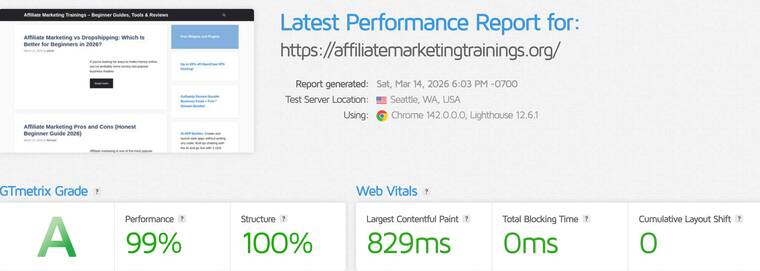
Note: This blog is hosted on Hostinger. Here's the test of speed by Gtmetrix.
Hostinger uses LiteSpeed Web Servers, which are much faster than the old Apache servers many cheap hosts use. When you combine Hostinger with a lightweight theme like GeneratePress, your site will fly. It handles traffic spikes surprisingly well for such a low price point.
SiteGround’s SuperCacher
SiteGround has a secret weapon called “SuperCacher.” This is a unique caching system they built themselves to make WordPress sites load almost instantly. They also use the Google Cloud infrastructure, which is one of the fastest networks in the world. Your visitors will definitely notice the “snappy” feel of a SiteGround site.
Ease of Use: Getting Your Site Online Fast
As a beginner, the last thing you want to do is look at lines of code. You want a “One-Click Install” for WordPress. You want a dashboard that looks like a modern app, not the cockpit of an airplane. Both companies have moved away from the old, ugly “cPanel” and created their own custom interfaces. This makes it much easier for you to manage your site, install SSL certificates (that little green lock), and create professional email addresses.
Hostinger’s hPanel Experience
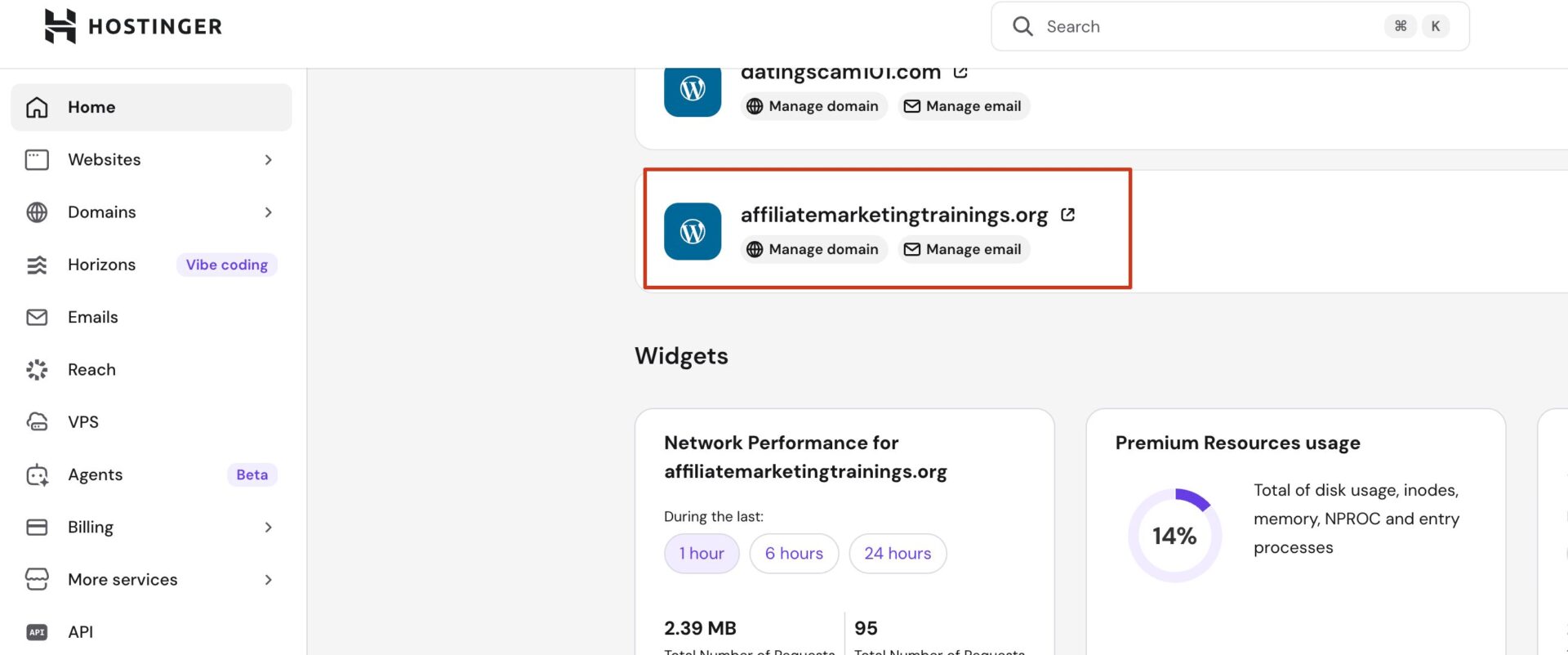
The hPanel is very intuitive. It uses big icons and clear labels. Even if you have never built a website, you can find the “Auto-Installer” in seconds. It feels very much like using a modern smartphone app, which reduces the “tech-anxiety” many new affiliate marketers feel.
SiteGround’s Site Tools
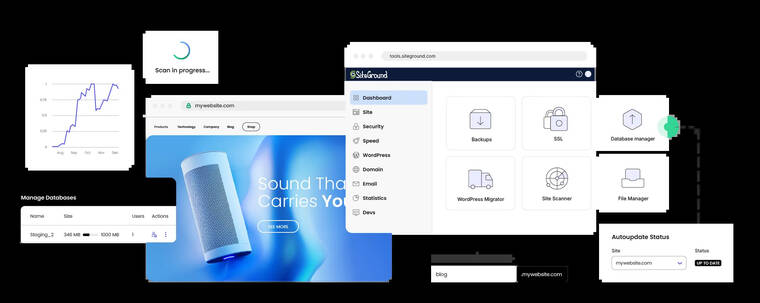
SiteGround’s “Site Tools” is incredibly powerful. It allows you to manage multiple sites with ease. One of my favorite features is the “Staging” tool, which lets you test changes on a private copy of your site before showing them to the world. It’s professional-grade software made simple.
Customer Support: Who Has Your Back?
Imagine it is 2:00 AM, you just finished a massive pillar post, and suddenly your site goes blank. Who are you going to call? This is where the true value of a host shows. Good support isn’t just about fixing problems; it’s about fixing them now. You want a team that understands WordPress and won’t give you generic, scripted answers. Support is the “insurance policy” for your online business.
Support at Hostinger
Hostinger offers 24/7 live chat. Their agents are generally very helpful and friendly. Because they have millions of customers, there might be a short wait time during busy hours, but they always follow up via email. They are great for general troubleshooting and setup help.
Support at SiteGround
SiteGround is legendary for its support. They are often rated #1 in the industry for customer service. Their agents are highly trained WordPress experts. If you have a complex plugin conflict with Elementor or GetResponse, the SiteGround team can usually spot the problem and fix it for you in minutes.
Security: Protecting Your Affiliate Commissions
Your website is an asset that will hopefully make you thousands of dollars. Unfortunately, hackers want those dollars too. You need a host that provides free SSL certificates, daily backups, and a strong firewall. If you are promoting sensitive apps like Spynger or Parentaler, your audience needs to know your site is secure. A “Not Secure” warning in the browser is the fastest way to kill your credibility as an affiliate marketer.
How Hostinger Protects You
Hostinger provides free SSL and basic DDoS protection. They monitor their servers 24/7 to block suspicious activity. They also offer weekly or daily backups, depending on which plan you choose. It is a solid, safe choice for any standard blog or small shop.
How SiteGround Protects You
SiteGround takes security to an extreme level. They have a custom AI bot that blocks millions of brute-force attacks every single day. They also provide free daily backups on all plans and a “Security Optimizer” plugin that hardens your WordPress installation against the most common threats.
Comparison Table: At a Glance
Sometimes you just need to see the facts side-by-side. This table compares the entry-level plans for both providers. Keep in mind that prices change, so always check their websites for the latest deals. If you are looking to promote shopping rewards like Rakuten or TopCashback, you want to ensure your host can handle the high volume of images and links those posts often require.
| Feature | Hostinger (Premium) | SiteGround (StartUp) |
| Starting Price | $2.99 / mo | $2.99 / mo |
| Renewal Price | Low | High |
| Free Domain | Yes (1st Year) | No |
| Server Tech | LiteSpeed | Google Cloud |
| Support | 24/7 Chat | 24/7 Priority Chat/Phone |
| Backups | Weekly (Daily on higher plans) | Daily (All plans) |
When to Choose Hostinger
Hostinger is the perfect choice if you are on a tight budget. If you are a beginner who is just “testing the waters” of affiliate marketing, start here. It allows you to get your site online for the price of a cup of coffee. It is also the winner if you need a free domain name included in your package, which saves you an extra $10-$15 right away.
Best for Multi-Site Beginners
If you want to build three different blogs—one for VPN reviews, one for Email Marketing tips, and one for Cashback sites—Hostinger’s Premium plan allows you to host up to 100 websites. This is an incredible value for someone who wants to experiment.
When to Choose SiteGround
Choose SiteGround if you are 100% committed to making this a long-term business, and you have a little extra money to invest. If you hate technical problems and want the fastest possible load times for your readers, SiteGround is worth the premium price. Their integration with Google Cloud makes them a “powerhouse” host that can grow with you as your traffic explodes.
Best for Serious Brand Building
If you are building a “Pillar” site designed to be the ultimate authority on a topic, you want the stability of SiteGround. Their uptime is nearly perfect, and their specialized WordPress tools will save you hours of frustration as your site gets more complex.
FAQ: Common Questions from Beginners
1. Can I move my site from Hostinger to SiteGround later?
Yes! Both companies offer migration tools. SiteGround has a “Migrator Plugin” that makes it very easy to move your site over if you decide to upgrade later.
2. Which one is better for the GeneratePress theme?
Both work perfectly with GeneratePress. Since GeneratePress is so light, it will be incredibly fast on either host. SiteGround might give you a slight edge in raw speed metrics.
3. Do I need to buy a VPN like NordVPN to manage my host?
It is not required, but it is highly recommended. Using a VPN ensures that your connection to your hosting dashboard is encrypted, especially if you are working from a coffee shop or traveling.
4. Does SiteGround offer a free domain?
Yes, both Hostinger and SiteGround offer a free domain name for the first year with their hosting plans, typically requiring a 12-month or longer subscription. Hostinger provides a free domain with its Premium and Business plans, while SiteGround includes it with new hosting packages. Both also include free domain privacy protection for that first year.
5. Is the renewal price really that different?
Hostinger is significantly more budget-friendly than SiteGround regarding renewals. Hostinger’s shared plans generally renew between $8–$17/month, while SiteGround’s plans jump steeply to approximately $18–$45/month, making SiteGround a premium-priced option. Hostinger offers better long-term value, while SiteGround relies on high-performance infrastructure.
6. If I want to promote high-ticket programs like Wealthy Affiliate, which host is better?
While both work, SiteGround offers a slight edge for high-ticket blogging. When you are asking people to invest in expensive programs, your site must look and feel “expensive.” SiteGround’s ultra-fast loading speeds and professional stability create an immediate sense of trust. However, if you are just starting your training and need to save money for your marketing budget, Hostinger is more than capable of handling the task.
7. I’m confused about “Managed WordPress” hosting. Do both offer this?
Yes, both provide managed features, but SiteGround is more “hands-on.” Managed hosting means the company handles technical updates and server optimization for you. SiteGround’s system is specifically tuned for WordPress performance and security. Hostinger offers great automated tools as well, but it feels more like a standard host that you manage yourself through their easy hPanel.
8. Will my site be safe if I promote “Spy Apps” or sensitive software?
Absolutely. If you are writing about apps like mSpy or Eyezy, you need top-notch security to protect your site from being flagged. Both hosts provide free SSL certificates (the padlock icon), which is essential. SiteGround has a more advanced AI-driven firewall that blocks malicious bots, making it slightly safer for niches that might attract unwanted attention from hackers or competitors.
9. Can I use Elementor to build my pages on these hosts?
Yes! Elementor works beautifully on both. However, because Elementor can sometimes be “heavy” and slow down a site, you need a host with good server resources. Hostinger’s LiteSpeed servers and SiteGround’s Google Cloud infrastructure both provide the “muscle” needed to keep an Elementor-built site running smoothly. Just remember to use a light theme like GeneratePress as your base to keep things fast!
10. Which host is better for international traffic?
If your affiliate blog targets a global audience (for products like NordVPN or GetResponse), both are winners. They both have data centers across the world (USA, Europe, Asia). Hostinger is particularly great because it lets you choose your server location for free during setup. SiteGround uses the Google Cloud global network, which is legendary for delivering content quickly to readers no matter where they live.
Conclusion
At the end of the day, both Hostinger and SiteGround are “A-tier” hosts. You cannot go wrong with either. If your main goal is to save money while you learn the ropes, go with Hostinger. They provide everything a beginner needs to succeed without breaking the bank. You will have enough left over to invest in tools like Mangools.
On the other hand, if you want the “Mercedes” of hosting and you value your time more than a few extra dollars a month, SiteGround is the clear winner. Their support and speed are industry-leading. No matter which one you choose, the most important step is to take action. Pick a host, install WordPress, and start writing your first review. Your future self will thank you for starting today!