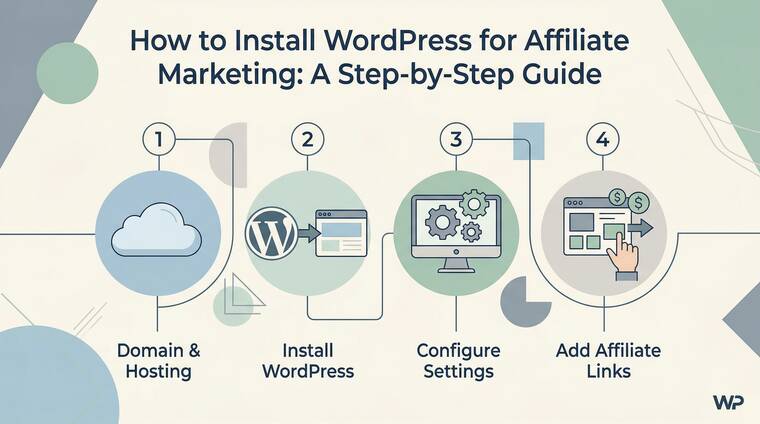
So, you want to start an affiliate marketing business? That is a fantastic choice! Building a website is the first real step toward earning passive income.
But let’s be honest: looking at technical settings can feel a bit scary. Don’t worry, though. I have built tens of sites using the GeneratePress theme, and I know exactly how to make this easy for you. By the end of this guide, you will have a professional WordPress site ready to promote brands like Wealthy Affiliate or Hostinger.
Setting up WordPress correctly is like building a strong foundation for a house. If you do it now, your SEO will improve, your site will load faster, and you will make more money in the long run. Let’s dive into the simple steps to get your blog online today!
1. Choose the Best Hosting for Your Affiliate Site
Before you can install WordPress, you need a place for your website to live. This is called web hosting. For beginners, you want something fast, cheap, and reliable. If your site is slow, people will leave before they click your affiliate links. I always suggest picking a host that offers a “One-Click WordPress Install” feature to save you time and headaches.
Why Hosting Matters for SEO
A good host keeps your site online 24/7. Google loves fast websites, so choosing a premium provider helps you rank higher. If you choose a bad host, your site might crash when you finally get a lot of traffic.
Top Hosting Recommendations
- Hostinger: The best balance of price and speed. Great for beginners.
- SiteGround: Incredible customer support and very high security.
- Wealthy Affiliate: Perfect if you want hosting plus affiliate marketing training in one place.
- InMotion Hosting: Very reliable for growing blogs.
2. Register Your Domain Name
Your domain name is your address on the internet (like www.YourName.com). It is your brand. You want something easy to remember and easy to type. Most people spend too much time overthinking this, but the key is to keep it simple. Avoid using hyphens or numbers if possible, as they make your site look less professional to your future readers.
Buying Your Domain
You can buy a domain directly from your hosting provider or a dedicated registrar. Buying from your host is usually easier because the connection is automatic.
Best Places to Buy Domains
- Namecheap: Very affordable prices and free privacy protection.
- GoDaddy: The most famous name in the business with frequent discounts.
- HostPapa: A great eco-friendly option with solid local support.
3. The Installation Process (Step-by-Step)
Now for the exciting part! Most modern hosts use a dashboard called hPanel or cPanel. You don’t need to be a coder to use these. You just need to find the button that says “Auto-installer” or “Install WordPress.” It usually takes less than five minutes. This process copies all the WordPress files onto your server so your site can start functioning.
Hostinger – Web Hosting with REAL POWER – Try Risk-Free
( 30-day money-back guarantee )
Now, we take Hostinger as an example – Install WordPress Using hPanel’s Auto Installer
Note: This site is built on Hostinger.
Firstly, log in to your Hostinger hPanel.
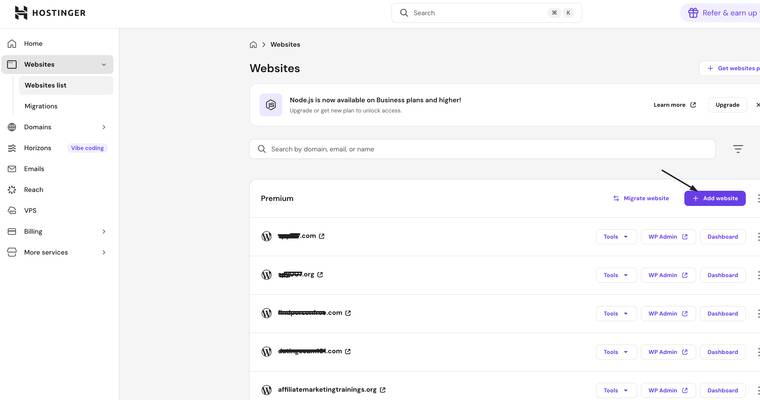
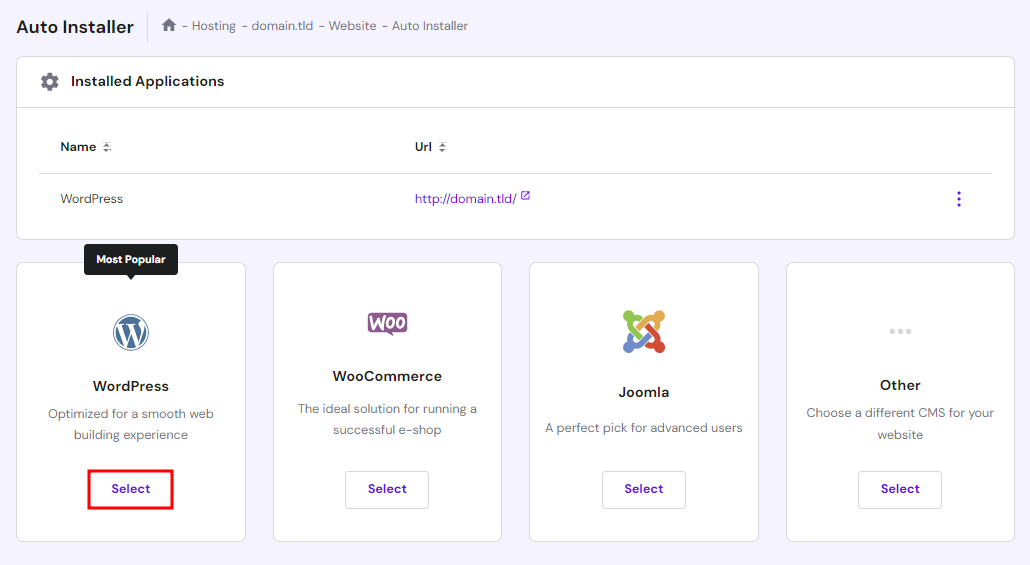
Step 1: Go to Website → Auto Installer from hPanel and select WordPress.
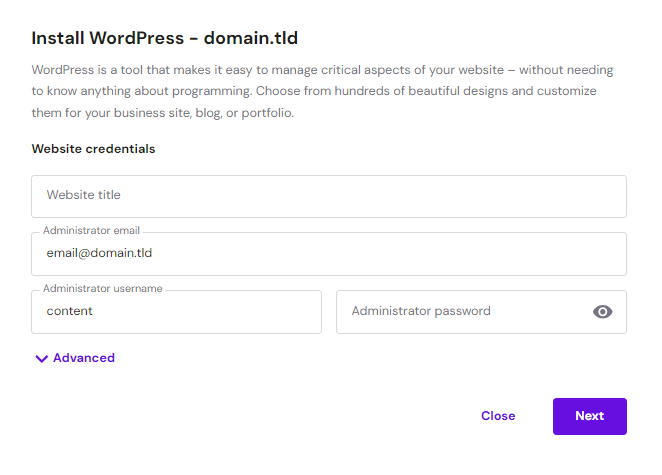
Step 2: Enter the site title, email address, username, and password for WordPress login. Hit Next.
Step 3: Set your preferred application version, language, and update schedule.
Set your preferred application version, language, and update schedule. We recommend choosing the Update only to minor version option for automatic updates. Once done, click Install.
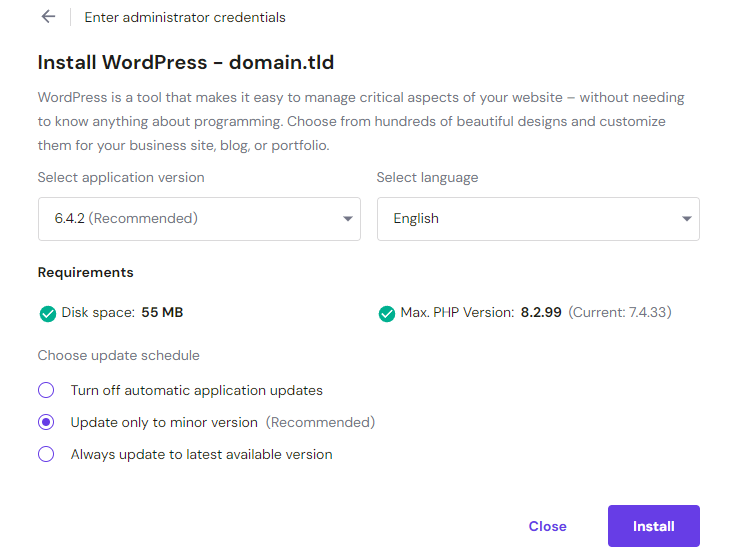
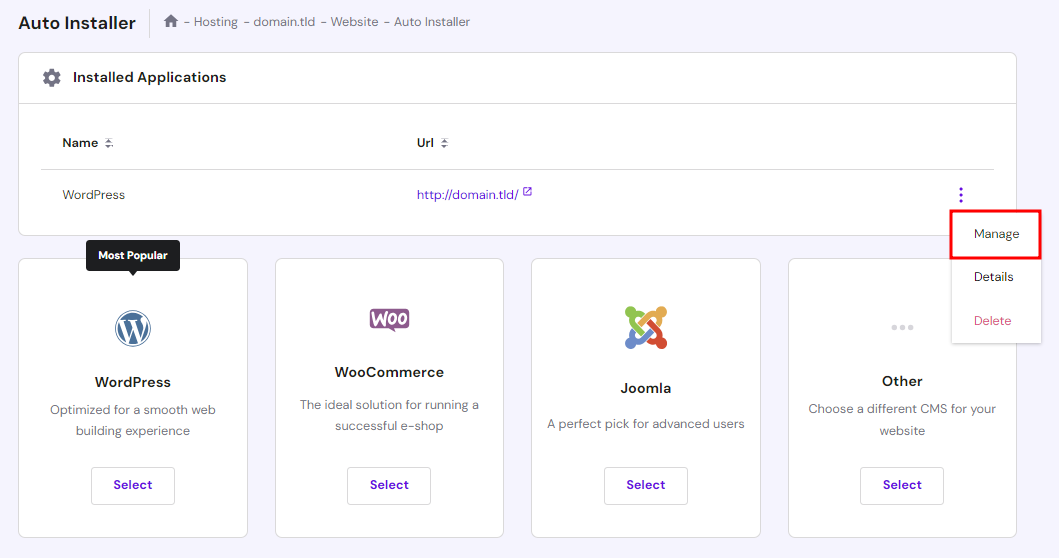
Step 4: Your installed WordPress instance will appear in the Installed Applications section.
Click on the three dots next to your WordPress URL and select Manage to access the hosting dashboard area.
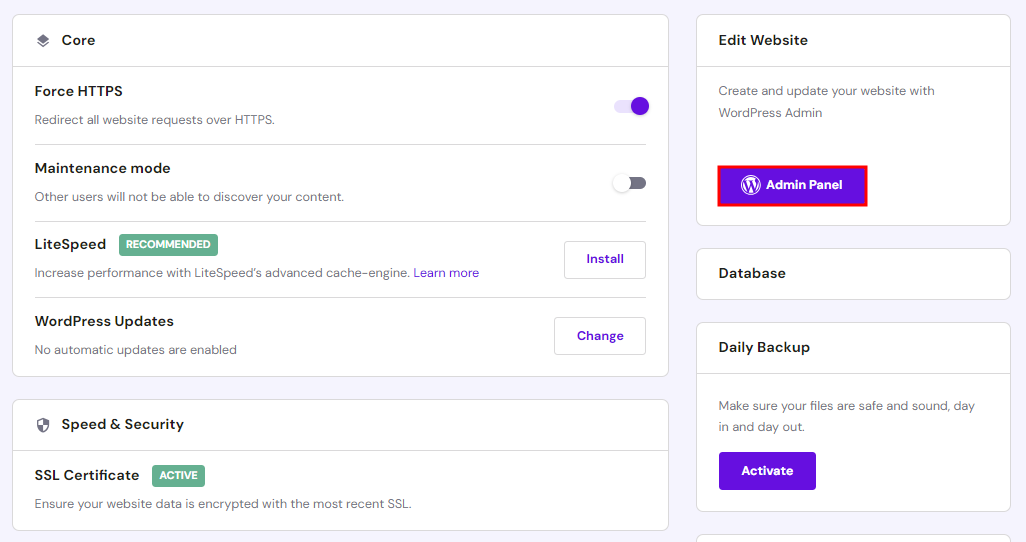
Step 5: Click the Admin Panel button to access the WordPress admin dashboard.
4. Essential Initial Settings
Once WordPress is installed, you aren’t quite done. There are a few “housekeeping” tasks to handle. These settings ensure that your affiliate links work properly and that Google can find your content. If you skip this, you might end up with “broken” links later on, which is a nightmare for your commissions.
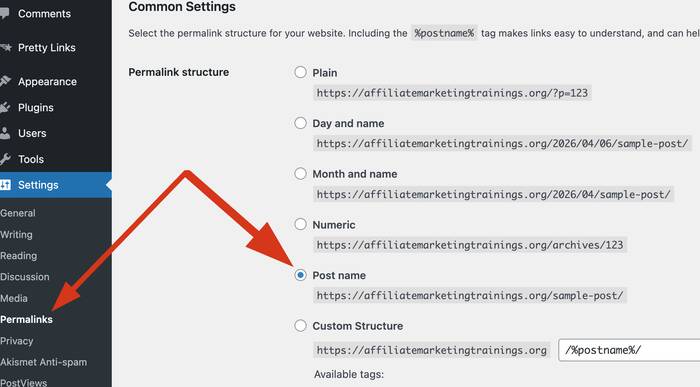
Change Your Permalinks
Go to Settings > Permalinks and select “Post Name.” This makes your URLs look clean, like mysite.com/best-vpn-review instead of mysite.com/?p=123.
Delete Default Content
WordPress comes with a “Hello World” post and a sample page. Delete these immediately so they don’t show up in Google search results.
5. Installing a Fast Theme (GeneratePress)
In the affiliate world, speed is king. I highly recommend the GeneratePress theme. It is lightweight, which means it loads instantly. Many beginners make the mistake of picking a “pretty” theme that is actually very slow. A slow theme will hurt your rankings on Semrush or Mangools. GeneratePress gives you a clean slate to build a beautiful, high-converting blog.
Why Use GeneratePress?
It is built for SEO. It works perfectly with page builders like Elementor, allowing you to create high-quality review pages for products like NordVPN or Surfshark.
How to Install Your Theme
Go to Appearance > Themes > Add New. Search for GeneratePress, click Install, then click Activate. It is that simple!
6. Must-Have Plugins for Beginners
Plugins are like “apps” for your website. They add new features without you needing to write code. However, don’t install too many, or your site will slow down. For an affiliate blog, you need tools for SEO, security, and link management. Using the right tools early on will save you hundreds of hours of manual work later.
SEO and Growth Tools
- Rank Math or Yoast: To help your articles rank on Google.
- Pretty Links: To turn long, ugly affiliate links into short, branded ones.
- GetResponse: To start building an email list from day one.
- Akismet Anti-Spam – The Spam Killer
7. Comparing Hosting Services for WordPress
Choosing between hosts can be confusing. To make it easier, I have created a quick comparison. Remember, as an affiliate marketer, you are looking for Uptime and Loading Speed.
| Feature | Hostinger | SiteGround | Wealthy Affiliate |
| Price | Very Low | Medium | High (Includes Training) |
| Speed | Excellent | Super Fast | Optimized |
| Best For | Budget Beginners | Serious Professionals | All-in-one Learning |
8. Security and Backups
You are building an asset. You must protect it. Hackers love targeting WordPress sites, so you need a plan. Using a strong password is the first step, but you also need a security plugin and a reliable backup system. If something goes wrong, you want to be able to restore your site with one click.
Most premium hosts ( all above web hosting services) offer daily backups. Ensure this is turned on so you never lose your hard-earned content.
9. Next Steps: Content and Promotion
Now that WordPress is installed, it is time to write! Start by creating reviews for products you trust. For example, you could write reviews about Semrush or Mangools for SEO. Use your GeneratePress layout to make the text easy to read. The goal is to provide value so people click your links and buy.
Joining Affiliate Networks
Once you have some content, join platforms like Impact.com, Awin, or Amazon Associates. These platforms connect you with thousands of brands.
FAQ: Frequently Asked Questions
1. Is WordPress free to use?
Yes, the WordPress software itself is free. However, you have to pay for web hosting and a domain name to put it online.
2. Can I change my theme later?
Absolutely! You can change your theme anytime, but using GeneratePress from the start is better because it prevents layout issues later on.
3. Do I need to know how to code?
Not at all. WordPress is designed for people who don’t know code. You click buttons and type like you are using Word.
4. How long does it take to see results?
Affiliate marketing is a marathon. It usually takes 3 to 6 months to start seeing traffic from Google, but it’s worth the wait!
5. Which hosting is best for multiple sites?
If you plan to build many blogs, Hostinger or InMotion Hosting offer plans that let you host 100 websites for one low price.
Conclusion
Installing WordPress is the “Green Light” for your affiliate marketing journey. It might feel like a lot of steps, but if you take it one at a time, you will be finished in 30 minutes. Remember to choose a fast host like Hostinger, use a clean theme like GeneratePress, and always keep your site’s speed in mind.
The most important thing is to start today. Don’t wait for the “perfect” moment. Get your domain, install WordPress, and start sharing your links for Wealthy Affiliate or Impact.com. You have the tools and the knowledge—now build something amazing!